Here are a few steps on how to create your own Weebly themes in a few minutes.
1. Launch Artisteer, then click the "Suggest Design" button several times, until you see a Weebly theme idea that you like (you can also use "Undo" and "Redo" buttons to browse previous ideas).


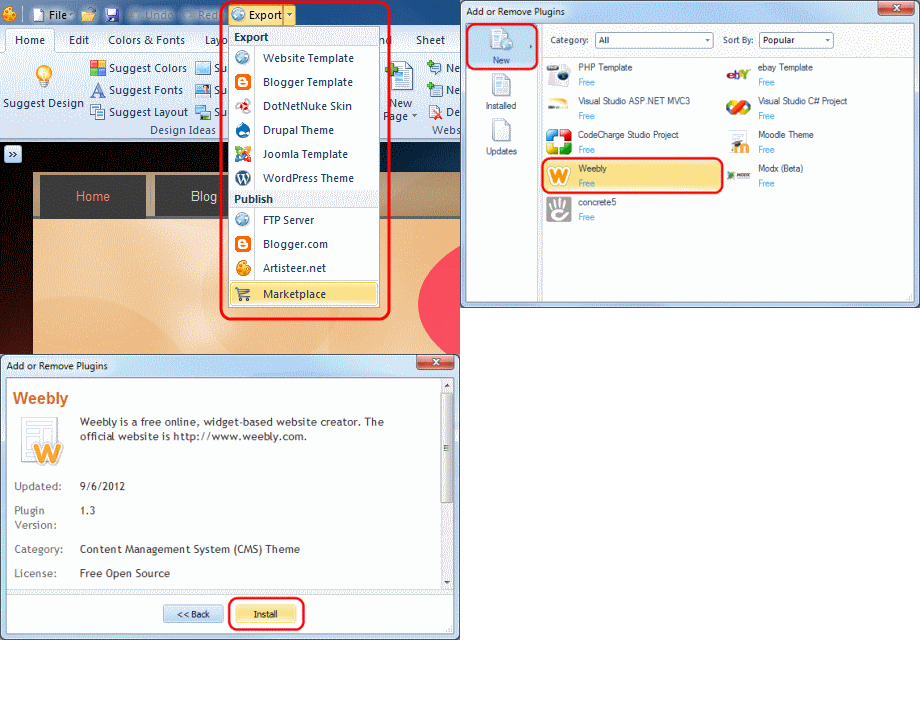
Note: The Weebly export plugin is not included in Artisteer 4.0 by default. Please install it (for free) from Artisteer Marketplace. Navigate Export -> Marketplace -> New -> Weebly to install the plugin.

4. Now you can export your theme to Weebly.
Congratulations on your great looking Weebly theme designed with Artisteer!

No comments:
Post a Comment